Edit Layout

iCarMode allows you to edit the layout by changing the buttons order.

All you have to do is tap the 'Edit Layout' option from the side-menu (or 'Edit' button in the top-right corner in version prior to version 6.0) and just drag and drop the icons till you get the order you like.

When you're finish, just tap the checkmark button on the top-right corner.
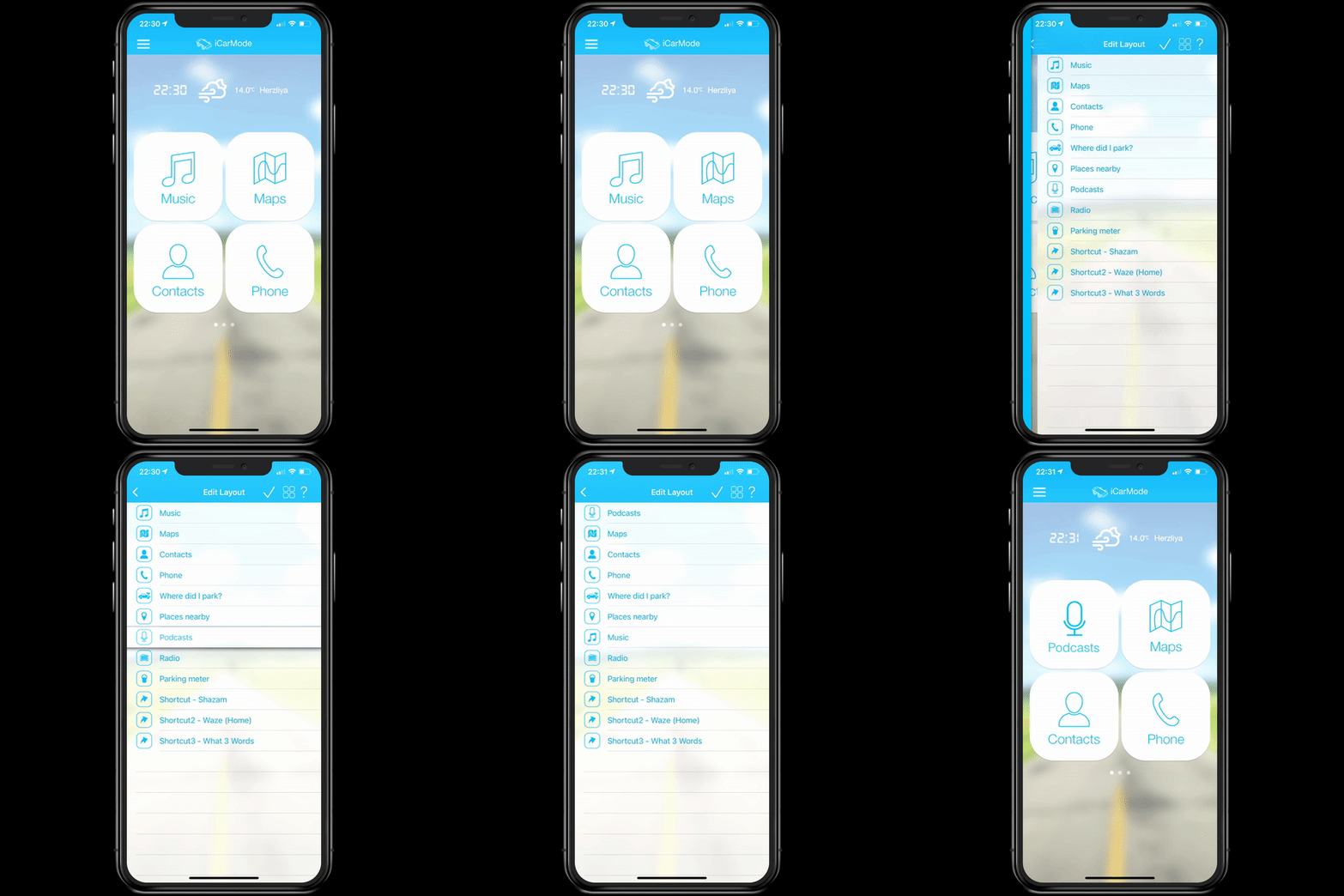
edit-layout
Easily edit your main menu

Enjoy!

Download iCarMode from the AppStore:

Download
Download

Related Posts

Notification Badge

iCarMode 9.0 Notifications: Manage Parking Reminders

In previous versions of iCarMode, a badge appeared whenever you had an active parking meter reminder or a saved parking location. The badge was useful, but it did not provide…

Read more
Open Garage

Arrival Shortcuts for Home and Work | iCarMode 9.0

iCarMode 9.0 introduces the new Driving Dashboard, bringing navigation, audio, driving information, and frequently used actions together on one glanceable screen. One of the dashboard’s most useful new features is…

Read more
shortcuts

Supported App Shortcuts in iCarMode: Music, Podcasts, Navigation, Radio and More

iCarMode can launch many popular music, radio, podcast, navigation, automation, and driving utility apps directly from large dashboard buttons. Here is the current supported shortcut list, grouped by category, with App Store links and feature notes.

Read more
iCloud

Keep Your iCarMode Setup Safe and Synced with iCloud

One of the most convenient features introduced in iCarMode 8.7 is iCloud Sync. This feature ensures that your personal setup — including your favorite places, music, and dashboard preferences —…

Read more
Shortcuts

Launch Any App from iCarMode Using Apple Shortcuts (Step-by-Step Guide)

iCarMode has always supported linking dashboard buttons to external apps using URL schemes. But what if your app isn’t on the supported list yet?With Apple’s Shortcuts app, you can link…

Read more
Shortcuts

iOS Automation Just Got Better: No More Confirmation for Shortcuts

For years, iOS users have been leveraging the power of Siri Shortcuts to automate everyday tasks, but there was always one limitation holding them back—many automation triggers required manual confirmation…

Read more