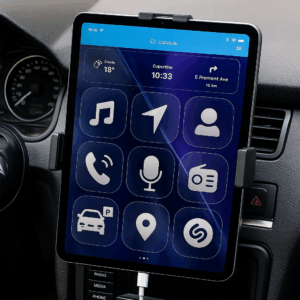
Introducing iCarMode Version 7.5: Customize Your Dashboard with Personalized Themes (Exclusive for Subscribers).
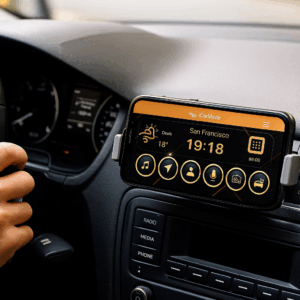
We're excited to announce the release of iCarMode Version 7.5, our latest update that brings a whole new level of personalization to your driving experience. With the introduction of the highly anticipated "Theme Wizard," iCarMode now allows our valued subscribers to take full control of how their iCarMode dashboard looks and feels.
Here's what you can expect from this exciting new update:
1. Personalize Your Look & Feel
Say goodbye to generic interfaces and hello to tailored experiences. With iCarMode 7.5, subscribers gain access to five distinct themes, each offering a unique set of design elements, button styles, and visual aesthetics. From sleek and modern to classic and refined, there's a theme to suit every taste and preference.
2. Background Image Customization
Make your iCarMode dashboard truly your own by customizing the background image. Choose from a selection of stunning pre-designed backgrounds or choose your own custom image to personalize your driving environment. Whether it's a breathtaking nature scene or a cherished family photo, you can now create a dashboard that reflects your style.
3. Button Size Options
We understand that ease of use is essential while on the road. That's why iCarMode 7.5 offers the flexibility to adjust button sizes. Opt for larger buttons to ensure quick and effortless access to your favorite features, or go for smaller buttons to maximize the number of buttons visible on the screen, minimizing the need for scrolling.
4. Font Color Customization
Enhance readability and aesthetics with the ability to customize font colors. Tailor the text on your dashboard to your liking, ensuring clear visibility and a visually pleasing experience that matches your chosen theme.
Introducing the Theme Wizard: Simple and User-Friendly
To ensure a seamless customization process, we've introduced the Theme Wizard, a user-friendly interface within the iCarMode settings. The Theme Wizard will guide you through the steps, making it easy to choose your preferred theme, background image, button size, and font colors. In just a few taps, you'll have a personalized dashboard that perfectly suits your style and preferences. To read more about this and see a demo of the theme wizard - see this article.
Bug Fixes and User-Requested Improvements
As always, we've listened to our users and addressed their feedback. In this version, we've squashed several bugs and implemented various small improvements to enhance the overall performance and user experience of iCarMode.
Exclusive for Subscribers
We're thrilled to announce that these exciting new customization features are available exclusively for our valued subscribers. Unlock the full potential of iCarMode by subscribing today and enjoy the freedom to create a dashboard that's uniquely yours.
Upgrade to iCarMode Version 7.5 now and experience the power of personalization in your driving journey. Stay tuned for more updates, as we're continuously working to improve your driving experience based on your valuable feedback.
Safe travels and happy driving!
Note: To download iCarMode Version 7.5 and access the new customization features, make sure you have an active subscription. For more information on subscriptions, see this article or contact our support team at support@icarmode.com.
Download iCarMode from the AppStore: